Python Refresher#
This chapter contains a number of Python exercises that you can use as a refresher, and to check if your level of Python matches the expectations of the course. We highly recommend to do them before the first lecture. If you encounter any problems, please visit the labs in the first week, where sample solutions to these exercises will be discussed.
1. Arithmetics#
Write a Python program that welcomes the user, asks for their name (string), weight in kg (integer) and height in m (float), computes the body mass index (BMI) from the information (weight/height\(^2\)) and finally displays a message to the user, saying something like:
Hello Jim, your BMI is 23.4.
You can assume that the user enters correct values.
# Your code
2. Conditional Branching#
Extend the BMI calculation program from the previous exercise so that after informing the user about the calculated BMI, it also prints out if the BMI is within the range that is generally considered normal (between 18.5 and 25) or higher (above 25) or lower (below 18.5) than that. The output of the modified program should then be something like:
Welcome to the BMI calculator.
What is your name? John Doe
What is your weight (in kg)? 78
What is your height (in m)? 1.82
Hello John Doe, your BMI is 23.5.
Your BMI is normal.
# Your code here
3. While-Loops#
Write a simple number-guessing game in Python. It generates a random number between 1 and 100 and asks the user to guess it. If the number guessed is too small or too big, a hint is given and the user can try again, until they guess the correct number. The output of the program should be something like:
Can you guess the number? 12
You guessed too small!
Try again: 23
You guessed too big!
Try again: 16
Yes!
# Your code here
4. For-Loops, Text Processing#
Write a simple text analysis program that finds the (first) longest word in a text. It should work on any text, but you can use the “lorem ipsum” as an example:
text = “Lorem ipsum dolor sit amet, consectetur adipiscing elit, sed do
eiusmod tempor incididunt ut labore et dolore magna aliqua. Ut enim ad
minim veniam, quis nostrud exercitation ullamco laboris nisi ut aliquip ex
ea commodo consequat. Duis aute irure dolor in reprehenderit in voluptate
velit esse cillum dolore eu fugiat nulla pariatur. Excepteur sint occaecat
cupidatat non proident, sunt in culpa qui officia deserunt mollit anim id
est laborum.”
To check if a character c is an alphabetic character, you can call the isalpha() function on it: c.isalpha(). It will return True or False.
The output of your program should report the longest word and its length, like this:
The longest word in the text is "reprehenderit" (13 characters).
# Your code Here
5. Functions#
In our lifetimes (unless we happen to get veeery old) a leap year occurs every four years. But actually, the rule is a bit more involved: A year is a leap year if it is a multiple of 4, but not a multiple of 100, unless it is also a multiple of 400. For example, 1984 and 2000 were leap years, but 1900 and 1985 were not.
Write a function is_leap_year(year) that tests if the year is a leap year. If so, the function should return True, and False otherwise. Implement the function using only one Boolean expression. You can use the code below to test your function:
tests = [1900, 1984, 1985, 2000, 2018]
for test in tests:
    if is_leap_year(test):
        print(f”{test} is a leap year")
    else:
        print(f”{test} is not a leap year")
# Your Code Here
6. Dataframes, Pandas#
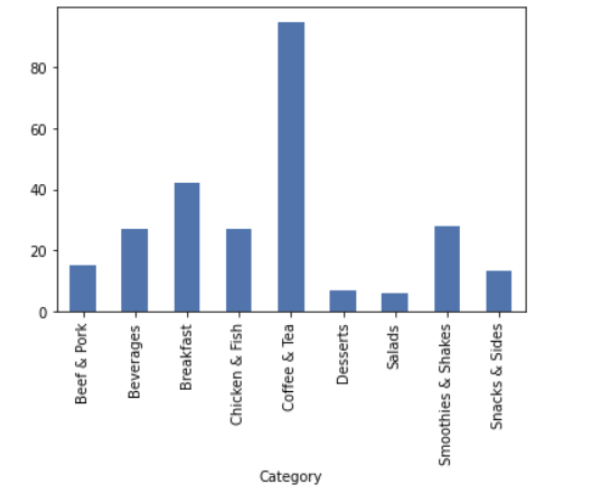
The file mcdonalds_menu.csv can be found in the gitUP repository under /data_sets. Write a program that reads the content of the file into a dataframe, and displays simple descriptive statistics about the numerical values in the data frame. Then add some code to create a barplot that displays the number of items per category. The output should look something like:
# Your Code Here
#path to mcdonalds_menu.csv on binder and collab should be data_sets/mcdonalds_menu.csv
7. Classes, Inheritance#
Define two classes Person and Student with the following characteristics: The base class Person provides a field name and a function printInfo to print information about
the person (i.e., the name). The class Student is derived from Person. A Student is a Person that in addition has a university, a studyProgram and a number of creditpoints. The class Student also has a printInfo function, which displays information about the university and program in addition to the student’s name. With the functions setCreditPoints and getCreditPoints the credit points of the student can be set and retrieved
# Your Code Here